


Simplocker – Android Ransomware Alert!

Last year, we came across a malware named Android Defender. This malware, once inside the victim’s phone, locks the device and demands a ransom to unblock it. This malware is classified as a screen-blocker type ransomware. But now, it seems like hackers have stepped up their game. A new Android malware is doing the rounds on the Internet. And it is being dubbed as the first Android ransomware that encrypts the infected device’s data and demands ransom to decrypt it. It is known as Simplocker.
What does Simplocker Look Like?
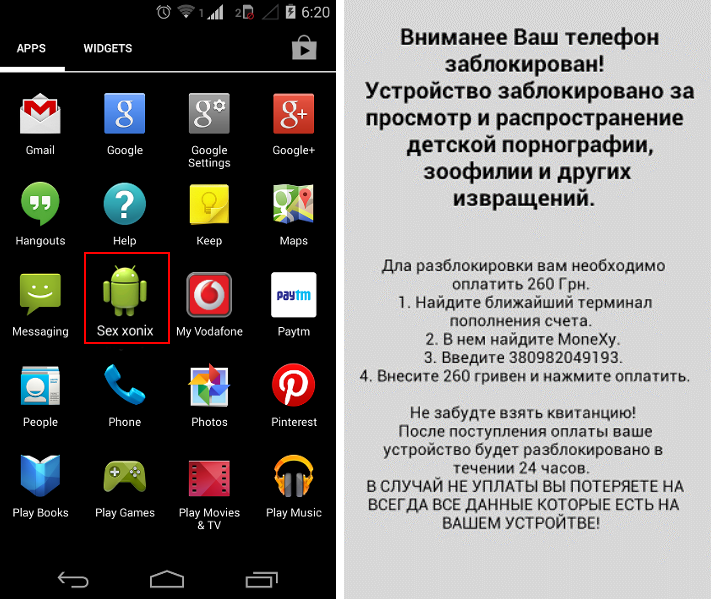
Once installed in the phone, Simplocker displays an icon named “Sex xonix,” as shown in the image below.
What Does Simplocker Do?
– Simplocker is a Trojan horse that masquerades as a harmless application for Android devices. Once installed in a device, it displays a message in Russian. The message informs the user that his data has been encrypted and demands a ransom to decrypt it.
– The ransomware disables the Back and Home button on the compromised device, when it displays its message on the screen. This makes it difficult to uninstall it. The malware is also designed to start every time the device boots.
– Simplocker scans the SD card of the infected device for various files including pdf, doc, mp4, png, jpeg, etc., and starts encrypting them. In other words, the malware converts files, videos, music files, pdfs, text files, and images into a form that cannot be read or used by the user.
– The Trojan sends the IMEI (International Mobile Station Equipment Identity) of the infected device to a remote server. This way, the attacker can know when the victim pays the ransom.
Some Important Facts About Simplocker
– Simplocker, currently, is only prevalent in the Ukrainian region.
– It has not been found in Google Play store.
– It demands a ransom of 260 Ukrainian hryvnias (£13) to decrypt the encrypted data of the victim’s phone.
– The level of encryption used by Simplocker is weaker compared to that used by CrytpLocker, the ransomware that targets the Windows platform.
Safety Tips to Prevent Simplocker Infection
1. Always install apps from Google play and official sites.
2. Turn off Bluetooth if not in use.
3. Install a reliable mobile security software that automatically scans apps before they run for the first time.
4. Take regular backups of your important data on your phone on cloud or external storage devices.
5. Before connecting your mobile devices to any computer, ensure that the latter is secure with a multi-layered antivirus software.
6. Avoid clicking links in unknown and unsolicited emails and SMSs.
7. Have your mobile apps updated to their latest version. And ensure that your mobile OS is updated too.
How Quick Heal Can Help
Quick Heal detects this ransomware as Android.Simplelocker.A, and protects user data from being
encrypted by the malware. Readers are advised to follow the safety measures listed above, and install Quick Heal on their mobile.