



Simple Privacy Tips for WhatsApp Users

The story of WhatsApp is every entrepreneurs dream scenario. CEO Jan Koum and Brian Acton, both formerly of Yahoo, founded WhatsApp in 2009 and never in their wildest dreams imagined how popular their service would become in a matter of months. WhatsApp is nothing but glorified text messaging, but its popularity and widespread usage cannot be discounted. Almost every functional smartphone today has a version of WhatsApp installed on it.
In April 2014, the number of WhatsApp users crossed 450 million, and they cumulatively shared 700 million photos and 10 billion messages every single day. All this without a mention of Facebook’s massive $19 billion takeover of WhatsApp in February 2014. Today, WhatsApp is one of the handful of services that define the tech industry and work towards changing the way our generation connects with each other.

Interestingly, WhatsApp’s largest user base resides in India and amounts to more than 50 million active users. With this in mind, we would like to post some security tips and advice for our Quick Heal readers, and inform them about some steps they can take to protect their privacy over WhatsApp.
Safety tips to follow while using WhatsApp
- Never send private information like bank account details, PINs or passwords through WhatsApp.
- Never accept files or begin downloads from messages sent to you by strangers or unknown numbers.
- Never respond to suspicious messages that come through from unknown numbers.
- WhatsApp as a service will never contact you through a WhatsApp message. Never trust any message that claims to come from WhatsApp and demands some payment for the service.
- Some scams say they can connect your PC with WhatsApp and send messages from a desktop. Do not believe these as this is not possible.
- Keep automatic downloads disabled so that you can always keep a check on what is being downloaded.
- Avoid using WhatsApp when you are connected to open Wi-Fi networks. These are hunting grounds for malware authors and data sniffers.
- Always keep an updated antivirus security solution installed and updated on your mobile device.
Tips for privacy settings over WhatsApp
While the aforementioned tips are useful for generic purposes, there are some steps you can take to protect your privacy over WhatsApp. Usually, messages can be received from anyone so this is a major loophole in the app. However, this is something that is a salient feature of the app, do not expect this to be disabled anytime soon. Nevertheless, you can take these steps to safeguard your privacy over WhatsApp.
# Step 1 – Go to Settings and click on Account.

# Step 2 – Now click on Privacy.
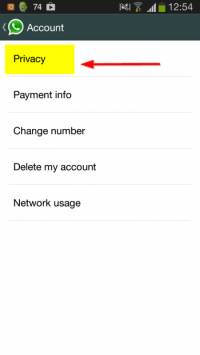
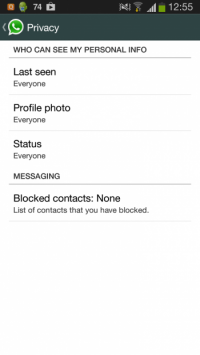
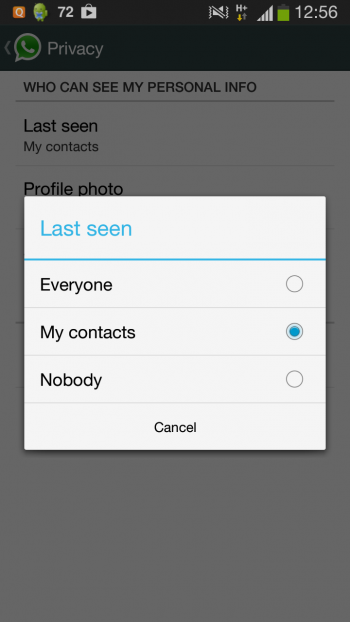
# Step 3 – Over here you can view and change settings for Last Seen, Profile Photo and Status. It is advisable that for all these 3 options, you select My Contacts.
Unfortunately, blocking all messages from unknown numbers is not possible over WhatsApp. However, if you have received a message from an unknown number and wish to receive no more messages from that number, you can open that particular chat window and block the contact from there.
With these small privacy tips for WhatsApp in mind, you can definitely ensure that your usage over this app is as secure as possible. Additionally, by installing an award winning solution like Quick Heal Total Security on your device, you can also ensure that your smartphone remains protected against all kinds of mobile security threats. Stay safe!