



Protect your Android with Quick Heal Total Security

If our readers can recall, then in an earlier post we presented a report on the top 20 Android malware. In this post, we tell you how Quick Heal can help protect your Android devices from the ever-growing malware threat.
Android malware growth since 2012
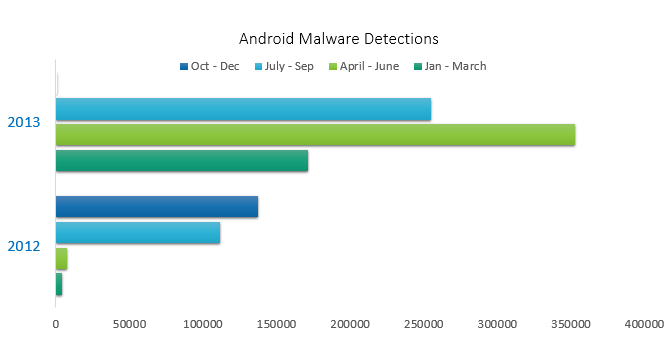
As of September 2013, the Android OS holds over 91% market share in India, while it has 51% in the U.S. market. Android’s ever growing popularity and staggering market share is acting as a syrup attracting malware artists from all the dark and dingy corners of the world. Unfortunately, most people do not think about mobile security as much as they think about securing their home and office computers. While most users are oblivious to the risks of mobile malware, others are not aware that a reliable mobile antivirus software can save a good deal of trouble if their device gets lost or stolen.
Quick Heal Total Security for Android brings to you a range of features that can wall your Android against all kinds of malware threats:
Anti-theft
As the name suggests, this feature helps you track your phone in case it is stolen or lost.
Proactive Virus Scanner
As soon as you install any app on your phone, Quick Heal runs a scan and tells you whether the app is safe or malicious.
Call Blocking
With this feature, you can block calls from unwanted or unknown numbers. It works as a charm for people who are troubled with telemarketing calls.
Parental Control
This is an advanced feature of Quick Heal Total Security for Android. It enables you to control and schedule Internet access on your phone. This also incorporates the Web security feature which blocks fraudulent and phishing Web sites.
SMS Block
This feature works in a similar fashion like the Call Blocking feature. It allows you to blacklist numbers that send you unwanted SMSs.
Backup
This functionality allows you to take backup of your important data, and retrieve it whenever required.
Network Monitor
Check and control data usage on your phone with this feature. You can also use it to manage the networks that are being used on your phone.
Performance Monitor
Know how your device is functioning, and increases its efficiency with this feature.
Remove Personal Data
If you wish to remove any sensitive data from your phone and make it unrecoverable by anyone, then this feature will come in handy.
News
Quick Heal believes in keeping people aware and up-to-date about the IT security world. And with that thought in mind, it has incorporated the News feature that will constantly bring latest news, alerts, and tips related to IT security.
Remote Device Management
You can lock and unlock your phone, and wipe its data remotely using the Remote Device Management tool. All you need is a simple text message to perform all these actions.
Automated Virus Updates
Regular virus updates are essential. To ensure that you do not miss out on them, this feature takes automated virus updates to keep your phone safe and secure all the time.
How to give your phone the Quick Heal Total Security Protection
It’s easy. Visit the Google Play store and search for ‘Quick Heal Total Security’. Click ‘Install’, and voila, your phone is protected!
For more information on the product, visit:
Google Play store
www.quickheal.com