




Lost Your Android Phone? Google its Location to find it

Have you ever experienced the stress that comes with a lost /stolen phone and wondered if there was a simple yet effective way to track your smartphone? Google now has a solution for you, and it is as simple as it gets. If you wish to pinpoint the exact location of your Android phone, all you need to do is visit Google and type “find my phone”. The Android Device Manager will then show you the exact location of your device and a host of other useful features as well.
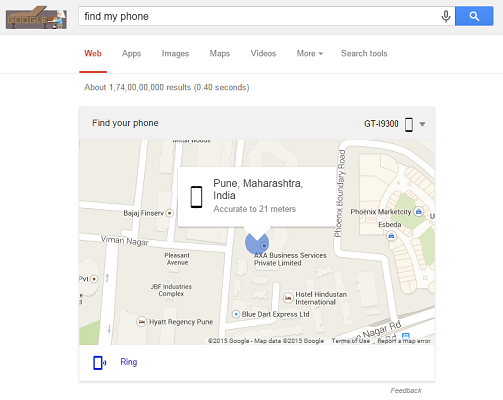
As of now, this tool is only available in English but its functionality is expected to reach out to other native languages in the near future as well. In addition to showing the location of the device on a map, the feature also allows you to ring the device. This allows you to locate your Android if it is in your room and you just can’t seem to find it. Another benefit of this feature is that your device GPS does not need to be switched on in order to make this feature work. However, the device does need an active data plan or Wi-Fi connection for this.
Android users can also setup a Lock and Erase functionality via the Android Device Manager interface. With the help of these functions, the device can be erased of all confidential data and can be locked remotely as well. Subsequently, the device can only be unlocked with the help of a preset password. Indeed, this is a great feature for parental control measures as well as parents of young children can now easily see the location of their kids with a simple Google search.
Locate your device with the aid of Quick Heal
Needless to say, it is never enough to rely on such features of one service alone. It is always advisable to use multiple services for the same function, especially when the device in concern is your smartphone. Possibly, there is a lot of sensitive within your smartphone that you just don’t want falling in the wrong hands. For this purpose, you can also use Mobile Security or Total Security for Android to locate your lost device. This and other anti-theft features can easily be accessed via the Remote Device Management (RDM) account that can be setup within seconds. With all these security protocols in place, locating a lost or stolen device is now easier than ever.