




CryptoLocker – the New Ransomware on the Loose

Previously we had reported about the “FBI virus”. The virus locks the computer screen and stops the user from using the infected machine until they agree to pay a certain amount of money to the cybercriminal.
Today, we will discuss a new entry in the list of file encrypting ransomware; it is known as “CryptoLocker”. Last week some of our customers had reported the occurrence of this malware. Once it gets executed, it encrypts files in the victim’s computer, and demands a certain ransom for decryption. This ransomware is spread using social engineering tricks via social media and email attachments.
How does CryptoLocker work?
– When CryptoLocker gets executed, it copies itself at the root of %APPDATA% folder with names as {GUID}.exe and takes up hidden attributes.
For example, C:Documents and SettingsAdministratorApplication Data{71257279-042B-371D-A1D3-FBF8D2FADFFA}.exe
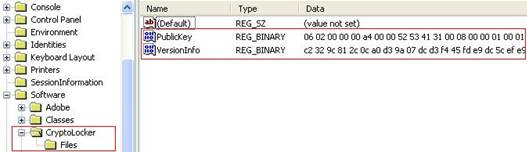
– The ransomware uses RSA algorithm with 2048 bit key. It communicates with random servers whose names are generated using Domain Name Generation (DGA) algorithm. The server generates a pair of public and private key for the machine of the targeted user. The private key is kept on the server for the next 72 hours. The public key is sent to the malware running on the user’s machine using secure communication, which is stored under HKCU registry key as shown in the following image:
– The malware starts looking for files extension mentioned in the following list.
From the list, as we can see, the malware targets all users who possibly would have some important information stored on their machine and would want to restore it back.
*.odt, *.ods, *.odp, *.odm, *.odc, *.odb, *.doc, *.docx, *.docm, *.wps, *.xls, *.xlsx, *.xlsm, *.xlsb, *.xlk, *.ppt, *.pptx, *.pptm, *.mdb, *.accdb, *.pst, *.dwg, *.dxf, *.dxg, *.wpd, *.rtf, *.wb2, *.pdf, *.mdf, *.dbf, *.psd, *.pdd, *.eps, *.ai, *.indd, *.cdr, ????????.jpg, ????????.jpe, img_*.jpg, *.dng, *.3fr, *.arw, *.srf, *.sr2, *.bay, *.crw, *.cr2, *.dcr, *.kdc, *.erf, *.mef, *.mrw, *.nef, *.nrw, *.orf, *.raf, *.raw, *.rwl, *.rw2, *.r3d, *.ptx, *.pef, *.srw, *.x3f, *.der, *.cer, *.crt, *.pem, *.pfx, *.p12, *.p7b, *.p7c
The list of infected documents is kept under HKEY_CURRENT_USERSoftwareCryptoLockerFiles to avoid multiple encryptions.
The CryptoLocker Ransomware Looks like this:
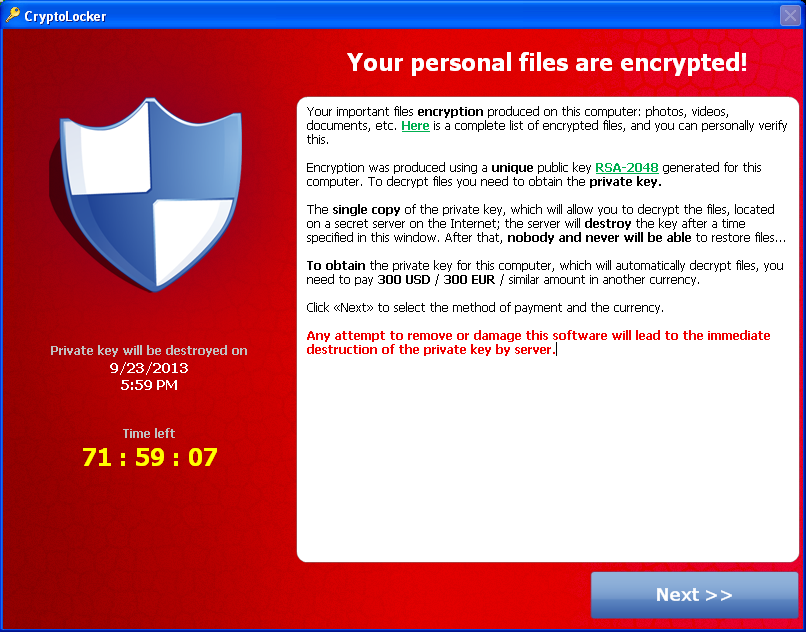
CryptoLocker provides three ways of making payment , viz. MoneyPak, Ukash and Bitcoin. The amount is equivalent to 300 USD. The amount could be paid in 15 different currencies. Bitcoin, reportedly, is being increasingly used by malware authors.
It is extremely difficult to recover encrypted files once they are encrypted with RSA algorithm, until we have the private key.
How can you Detect CryptoLocker?
Quick Heal detects this family of ransomware as Trojan.Crilock.A.
Recommended Security Measures
Taking the following security measures would help reduce the risk of such malware attack:
- Ensure that all important software on your machine, such as the Operating System, Adobe Reader, Microsoft Office, and internet browsers to name a few, are patched and up-to-date.
- Keep your machine’s security software up-to-date.
- Avoid clicking URLs and opening unsolicited email attachments, particularly from unknown sources.
- Be careful while using removal medias such as pen drives, external hard disks, etc. that are connected to machine not protected by updated security software.
- Always keep a backup of all your important documents using a reliable backup software.
As technology is touching newer grounds, malware authors are discovering better and sneakier ways to attack their targets. If one malware family is taken down, another one gets developed in no time. In such a scenario, taking the right precautionary measures and using the right security tools, should be your best defense against all malware in the wild.