


Beware of the Hidden Threats of Corrupted Software Files!

From a minimal calendar app, to a jazzy media player or a popular PC game, we all love downloading freebies from the Internet. And this common interest of ours is just well too known by attackers.
Downloadable files on the Internet are one of the most common mediums used by attackers to transmit viruses and malware. An attacker can insert a malicious code into a file which could be a word doc, image, or any other file which is normally considered to be innocuous. Once the attacker has compromised a file, they may distribute it via an email, websites, torrent link, social media channels, etc. The type of malicious code launched by the attacker depends on the end result they want to achieve. For instance, if a hacker is after your personal information like usernames, passwords, bank account information, etc., then they would trick you into downloading a spyware-infected file on your computer. Once inside the system, the spyware will collect all possible information about you and pass it on the attacker.
So, what common problems can corrupted software cause?
Depending on the malicious code the software has been corrupted with, the problems may vary. However, most malicious codes are designed to perform one or more of the following functions:
- Slowing down your computer. Infected machines may start freezing frequently, and become unresponsive.
- Corrupting the core files of the infected computer.
- Stealing data stored in the computer, and information related to the user’s Internet activities.
- Allowing other viruses and malware to gain entry into the system.
- Giving partial or full access of the computer to the attacker.
- Using the infected computer as a bot to attack other victims.
- Redirecting users to fake websites and stealing their login ID and passwords, even financial details.
- Causing the computer to use too much memory and resources than normally required.
- Causing random files to go missing without your knowledge.
Safety Tips
1. The most important measure to take is to be extremely choosy about free software available on the Internet. Before downloading any type of application, ensure that you
- Do a quick research on the software, its user reviews and ratings.
- Ensure that the site you are downloading the software from is well-known and trusted.
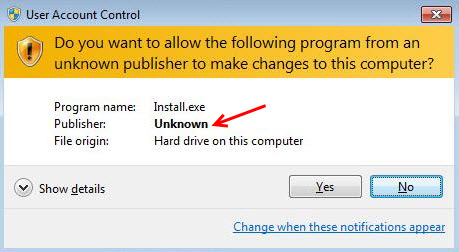
2. While installing the software, check if it’s from a verified publisher. If it’s not, then do not proceed.
3. Install an antivirus software in your PC. When you are going for it, ensure that the software offers protection against unsafe websites, infected files downloaded online, emails that carry infected links or attachments, and all types of virus and malware infections.
4. Be skeptical about unwanted or unknown emails. Even if the sender seems familiar, exercise caution if the email talks about something which you were not expecting or have no prior knowledge about.
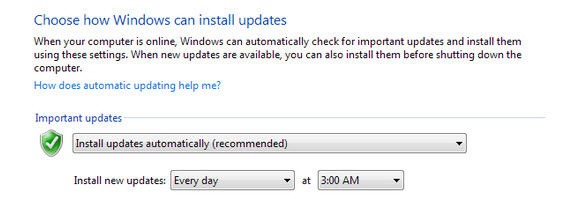
5. Apply software updates whenever available. This is more important with Windows security updates that are released periodically. Doing so will fix any security holes that might be present in your system. Security holes are a hacker’s prime method to get their malicious code to execute on a victim’s machine. It is strongly recommended to always keep the Windows Automatic Updates ON.
Related information
• Why are Software Updates so Important for your Security