


Quick Links


Popular Searches



Close
Products
Looking for enterprise solutions?
Discover SeqriteLooking for enterprise solutions?
Discover SeqriteLooking for enterprise solutions?
Discover SeqriteLooking for enterprise solutions?
Discover SeqriteLooking for enterprise solutions?
Discover SeqriteAbout Product upgrade:
Product upgrade is an automated process to upgrade the existing product in new version (Uninstallation of older version -> Installation of new version-> Activation of new version), where you just need to download the setup, execute it & restart the system as per notification
System restart is mandatory in order to complete the upgrade process
Here are the steps which gives details about upgrade process
Step 1: Make a note of Quick Heal Product key
Step 2: Visit the link: https://www.quickheal.com/upgrade/#select-product
Step 3: Download the appropriate Quick Heal Upgrade 22.00 file on your PC

Step 4: Double-click the downloaded file.
Step 5: The 'Quick Heal Setup Downloader' window will appear. Click 'Download'. The upgrade file may take few minutes to download. You can pause and resume the download as per your convenience.

Step 6: Execute the downloaded file which will start process

Step 7: After extraction, Upgrade window will be appear as below, Click on Continue to proceed
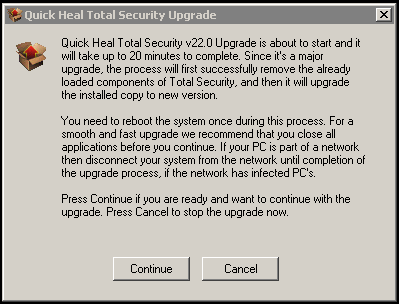
Step 8: Upgrade process will be started with uninstallation of older version

Step 9: After completion of uninstallation process,system restart is required, Click on Restart now & Finish
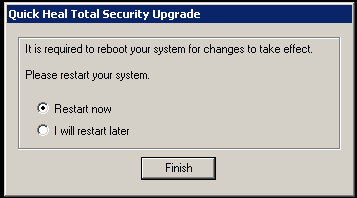
Step 10: System will be restarted
Step 11: Post starting of system, Installation of latest version will start automatically
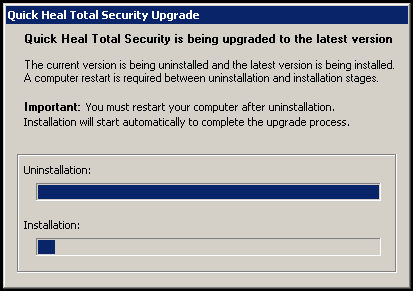
Step 12: Wait till process is completed

Step 13: Upgrade process completion message will be displayed as below, Click on OK

Completion Status

Please complete your information below to login.